This example belongs to Eclipse JDT Tutorial Series.
Normally, Eclipse JDT is used in a plug-in environment. This is the normal situation in which we deal with each project in the workspace. However, if we want to parse a large amount of java file, this approach may not be good, since it is not easy to import many projects to workspace manually. (We can import projects automatically, but that’s another story.)
Can we use Eclipse’s ASTParser to parse java source code in a standalone application, instead of a plug-in? I asked the same question, before I found the solution. Here is a complete code example which ASTParser works in a standalone application.
import java.util.HashSet; import java.util.Set; import org.eclipse.jdt.core.dom.AST; import org.eclipse.jdt.core.dom.ASTParser; import org.eclipse.jdt.core.dom.ASTVisitor; import org.eclipse.jdt.core.dom.CompilationUnit; import org.eclipse.jdt.core.dom.SimpleName; import org.eclipse.jdt.core.dom.VariableDeclarationFragment; public class Test { public static void main(String args[]){ ASTParser parser = ASTParser.newParser(AST.JLS3); parser.setSource("public class A { int i = 9; \n int j; \n ArrayList<Integer> al = new ArrayList<Integer>();j=1000; }".toCharArray()); //parser.setSource("/*abc*/".toCharArray()); parser.setKind(ASTParser.K_COMPILATION_UNIT); //ASTNode node = parser.createAST(null); final CompilationUnit cu = (CompilationUnit) parser.createAST(null); cu.accept(new ASTVisitor() { Set names = new HashSet(); public boolean visit(VariableDeclarationFragment node) { SimpleName name = node.getName(); this.names.add(name.getIdentifier()); System.out.println("Declaration of '"+name+"' at line"+cu.getLineNumber(name.getStartPosition())); return false; // do not continue to avoid usage info } public boolean visit(SimpleName node) { if (this.names.contains(node.getIdentifier())) { System.out.println("Usage of '" + node + "' at line " + cu.getLineNumber(node.getStartPosition())); } return true; } }); } } |
It will print out the following message:
Declaration of 'i' at line1
Declaration of 'j' at line2
Declaration of 'al' at line3
All problems, such as “The type org.eclipse.core.runtime.IProgressMonitor cannot be resolved. It is indirectly referenced from required .class files”, etc, are caused by missing libraries.
Here is the jar files required:
org.eclipse.core.contenttype.jar
org.eclipse.core.jobs.jar
org.eclipse.core.resources.jar
org.eclipse.core.runtime.jar
org.eclipse.equinox.common.jar
org.eclipse.equinox.preferences.jar
org.eclipse.jdt.core.jar
org.eclipse.osgi.jar
The following are what I used for this sample program.
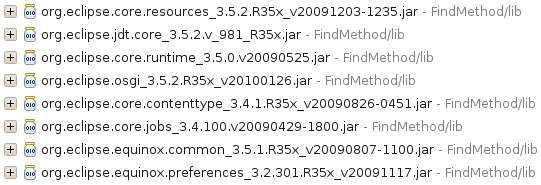
These jar files will be under plugins directory, once you installed astview plugin. Here is post about how to add astview plugin. For convenience, I also made a rar file which includes all required jar files. You can download it directly here.
This is another article that might be useful for you to understand AST.
hi Can you please share your code . i am working in this project but could not find exact solutions ..
Thanks this was very helpful.
You can parse .java file instead http://www.programcreek.com/2011/11/use-jdt-astparser-to-parse-java-file/. Then in your defined visitor, visit TypeDeclaration and record the name:
public boolean visit(VariableDeclarationFragment node){
//…
}
how i can get the name of class the method invoked inside it
class A{
getmethod();
}
i need the result like this
“method invoked” : getmethod()
“in class”: A
Thanks I think the same 😉
An example using less dependencies and a TreeView.
https://github.com/ricardojlrufino/eclipse-cdt-standalone-astparser
Thanks you very much !!!
Appreciate ur efforts, Mr. Wang.. Grateful
nice post!how can i get method names and method inputs?
Nice post! I really appreciate your time and your dedication. You collected and gave us all jar library files. This save tons of time for us.
Again, thank you so much.
Thanks for this post.
it is really good post for method body text extract.
use this post i able to extract method body variable and define location of invoke other method
Thanks for this post – it’s really the quickest way to get started with a standalone parser using Eclipse JDT.
Thanks for this nice snippet, it really worked on the first go in less than 5 minutes. 🙂
Hi!!! I’m trying to use JDT, but I would like to use it for any project. This is, a project that is not in the Eclipse workspace. How can I load a project and use JDT to rewrite it? Thanks,
Gleiph
Thanks for writing this. I was disappointed to see that there is no official Eclipse package that includes the compiler and ASTparser.
I have posted this question on the forum – http://www.eclipse.org/forums/index.php/m/740970/#msg_740970
how can i set a .java file as an ICompilationUnit in setSource function? tnx
Have you tried AST Viewer? You can first use it to explore the structure of AST and then may get the idea about how to select elements you want.
Hi spyros,
Check out the following post. It may help you.
http://www.vogella.de/articles/EclipseJDT/article.html
Regards!
hi, i want to get info from every class of a .java file so that i can save in a structure (maybe a list) the methods that every method of every class calls. Can anyone help me? thanx!
I’ve just found that the following jar reference was the cause:
org.eclipse.equinox.common_version.jar.
I’m facing the following problem in the line 23:
The type org.eclipse.core.runtime.IProgressMonitor cannot be resolved. It is indirectly referenced from required .class files
Here is the code:
final CompilationUnit cu = (CompilationUnit)parser.createAST(null);
Does anyone have any clue?
Thanks in advance!
There is a plugin “ASTView” like firebug which let you see explore ast easily. http://www.eclipse.org/jdt/ui/astview/index.php
Also, How can I parse the annotations of the method. For ex, I am writing a contract for a method using cofoja’s @ensures and @requires, how can i parse the annotations of these methods.?
nice article. How can I parse a particular method (say display()) which is empty and then I want to add some code to the body of that method. How this can be done using JDT?
if could suggest a solution to question kindly reply me on [email protected]
Thanks
Thanks. That’s a very good idea.
nice article ! u should also point to the usage
of the anonymous class – thats a typical
pattern in these kind of projects