By using eclipse export wizard, you can get executable jar files. But the jar file can be only launched by using command lines. Apparently, this is not a good option for most regular not-java-programmer users, especially if the program requires user’s input to proceed. We need a program which can be started by double clicking.
To convert .jar file to windows executable file, there is a good tool called launch4j. You can easily convert a jar file to exe, then your users can double click the icon and start the program.
Here is a snapshot of this tool:
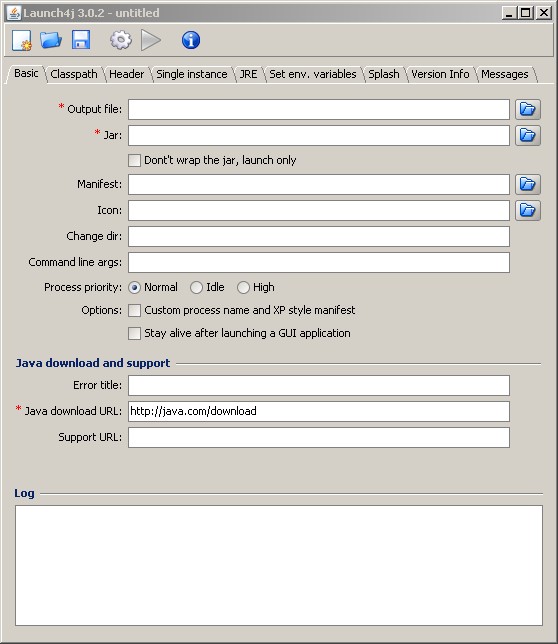
How to use launchrj is very straightforward and it’s free without any strings attached.
The following is some other features it has:
- JAR files can be included into an executable file;
- Execute Java applications with any current directory;
- Java applications can make use of file type association;
- Java applications are viewed as native Windows programs (and you can create Windows shortcuts for your Java application in the Start menu or on the desktop);
- Use the icon (.ico file) of your choice or design for your executable;
- Fully localizable messages of the executable
As you will see in my later post, there is a a good eclipse plugin — fat jar which convert all java files to one jar file. You can first use fat jar to get one jar, then use launch4j to convert it to .exe file.
Bruv you should look up what a “for loop” is, it will save you a lot of time.
I got easy solution for converting jar to exe. This might help you: https://erainnovator.com/convert-jar-exe-file/
thank you, i was looking for this all over this is a great program, great help.
not sure what program your using but in most programs you can select eexport in the file menu then select runable .jar give a location and press ok or export to continue. go to the location you specified and it should be there. klick on it to run it if that does not work right klick and open it with java run-time environment.
i dont know what to do. here is java code .. can you teach how to make jar.
import java.io.*;
public class PMM
{
public static void main(String args[])throws Exception
{
BufferedReader br=new BufferedReader(new InputStreamReader(System.in));
String title=”******************WELCOME TO PMM BOOKING ROOM SERVICE*****************”;
String list[]=new String[19];//for Storing ROOM names.
list[0]=”ROOM1″;list[1]=”ROOM2″;list[2]=”ROOM3″;list[3]=”ROOM4″;list[4]=”ROOM5″;list[5]=”ROOM6″;
list[6]=”ROOM7″;list[7]=”ROOM8″;list[8]=”ROOM9″;list[9]=”ROOM10″;list[10]=”ROOM11″;list[11]=”ROOM12″;
list[12]=”ROOM13″;list[13]=”ROOM14″;list[14]=”ROOM15″;list[15]=”ROOM16″;list[16]=”ROOM17″;
list[17]=”ROOM18″;list[18]=”ROOM19″;
String Department[]=new String[6];//for Storing Department names.
Department[0]=”CIVIL”;Department[1]=”ELECTRICAL”;Department[2]=”MECHANICAL”;Department[3]=”COMMERCE”;Department[4]=”TOURISM”;Department[5]=”HOSPITALITY”;
String DepartmentN,ROOM,size;//declaration of String variables
String ans=”Q”;String ans1=”Q”;
int flag=0,flag1=0,flag2=0,flag3=0,flag4=0,catg,quantity,date,bvrg,tot_bvrg,fd;
int tot_fd=1,tot_d,d,ch;//declaration of Integer variables
do
{
System.out.println();
System.out.println(title);
System.out.println(“*********************************************************”);
System.out.println();
System.out.println(“<<>>”);
do
{
if(flag>0)
System.out.println(“** INVALID INPUT ! TRY AGAIN **”);
System.out.println(“~~~~~~~~~~~~~~~~~~~~~~~~~~~~~~~~~~~~~~~~~~~~~~~~~~~~~~~~~”);
System.out.println(“** CIVIL ELECTRICAL MECHANICAL COMMERCE TOURISM HOSPITALITY **”);
System.out.println();
System.out.print(“ENTER THE CORRECT Department NAME FOR YOUR CHOICE :”);
DepartmentN=br.readLine();
for(int i=0;i<6;i++)
{
if(Department[i].equalsIgnoreCase(DepartmentN))
{
flag=0;
break;
}
else
flag++;
}
}while(flag!=0);
System.out.println("f");//to clear the screen for next window
System.out.println(title);
System.out.println("*********************************************************");
System.out.println("<<>>”);
do
{
System.out.println(“~~~~~~~~~~~~~~~~~~~~~~~~~~~~~~~~~~~~~~~~~~~~~~~~~~~~~~~~~”);
System.out.println(“** 1.PMM “+DepartmentN+” BOOKING ROOM **”);
System.out.println();
System.out.print(“ENTER THE CORRECT CATEGORY NUMBER FOR YOUR CHOICE :”);
catg=Integer.parseInt(br.readLine());
if((catg==1)||(catg==2))
flag1=0;
else
{
System.out.println(“*** INVALID INPUT *** PLEASE TRY AGAIN”);
flag1++;
}
}while(flag1!=0);
System.out.println(title);
System.out.println(“*********************************************************”);
System.out.println(“f”);//to clear the screen for next window
System.out.println(title);
System.out.println(“*********************************************************”);
System.out.println();
System.out.println(“~~~~~~~~~~~~~~~~~~~~~~~~~~~~~~~~~~~~~~~~~~~~~~~~~~~~~~~~~”);
System.out.println();
System.out.println(“<<>>”);
do
{
System.out.println(“~~~~~~~~~~~~~~~~~~~~~~~~~~~~~~~~~~~~~~~~~~~~~~~~~~~~~~~~~”);
System.out.println(“** 1. MONDAY **”);
System.out.println(“** 2. TUESDAY **”);
System.out.println(“** 3. WEDNESDAY **”);
System.out.println(“** 4. THURSDAY **”);
System.out.println(“** 5. FRIDAY **”);
System.out.println(“** 6. SATURDAY **”);
System.out.println(“** 7. SUNDAY **”);
System.out.println();
System.out.print(“ENTER THE CORRECT NUMBER FOR YOUR SELECTED DAY :”);
date=Integer.parseInt(br.readLine());
if((date>=1)&&(date<=7))
flag2=0;
else
{
System.out.println("*** INVALID INPUT *** PLEASE TRY AGAIN");
flag2++;
}
}while(flag2!=0);
System.out.println("f");//to clear the screen for next window
System.out.println(title);
System.out.println("*********************************************************");
System.out.println("<<>>”);
System.out.println(“~~~~~~~~~~~~~~~~~~~~~~~~~~~~~~~~~~~~~~~~~~~~~~~~~~~~~~~~~”);
System.out.print(“ENTER THE NUMBER OF PERSON :”);
quantity=Integer.parseInt(br.readLine());
System.out.println(“~~~~~~~~~~~~~~~~~~~~~~~~~~~~~~~~~~~~~~~~~~~~~~~~~~~~~~~~~”);
System.out.println(“f”);//to clear the screen for next window
System.out.println(title);
System.out.println(“*********************************************************”);
if(catg==1)
{
System.out.println(“<<>>”);
do
{
if(flag3>0)
System.out.println(“*** INVALID INPUT *** PLEASE TRY AGAIN”);
System.out.println(“ROOM NAME”);
System.out.println();
System.out.println(“ROOM1”);
System.out.println(“ROOM2”);
System.out.println(“ROOM3”);
System.out.println(“ROOM4”);
System.out.println(“ROOM5”);
System.out.println(“ROOM6”);
System.out.println(“ROOM7”);
System.out.println(“ROOM8”);
System.out.println(“ROOM9”);
System.out.println(“ROOM10”);
System.out.println(“ROOM11”);
System.out.println(“ROOM12”);
System.out.println(“ROOM13”);
System.out.println(“ROOM14”);
System.out.println(“ROOM15”);
System.out.println(“ROOM16”);
System.out.println(“ROOM17”);
System.out.println(“ROOM18”);
System.out.println(“ROOM19”);
System.out.println();
System.out.print(“ENTER THE NAME OF YOUR SELECTED ROOM :”);
ROOM=br.readLine();
for(int i=0;i<19;i++)
{
if(list[i].equalsIgnoreCase(ROOM))
{
flag3=0;
break;
}
else
flag3++;
}
}while(flag3!=0);
System.out.println();
System.out.println("<<>>”);
System.out.println(“~~~~~~~~~~~~~~~~~~~~~~~~~~~~~~~~~~~~~~~~~~~~~~~~~~~~~~~~~”);
System.out.println(“** 1.PMM “+DepartmentN+”**”);
System.out.println(“ROOM Selected :”+ROOM);
System.out.print(“Your Seat Number/s is/ are “);
for(int i=1;i<=quantity;i++)
{
System.out.print(1+i+" ");
}
System.out.println();
}
if(catg==2)
{
System.out.println("<<>>”);
do
{
if(flag3>0)
System.out.println(“*** INVALID INPUT *** PLEASE TRY AGAIN”);
System.out.println(“ROOM NAME”);
System.out.println();
System.out.println(“ROOM1”);
System.out.println(“ROOM2”);
System.out.println(“ROOM4”);
System.out.println(“ROOM5”);
System.out.println(“ROOM6”);
System.out.println(“ROOM7”);
System.out.println(“ROOM8”);
System.out.println(“ROOM9”);
System.out.println(“ROOM11”);
System.out.println(“ROOM12”);
System.out.println(“ROOM14”);
System.out.println(“ROOM15”);
System.out.println(“ROOM16”);
System.out.println(“ROOM18”);
System.out.println(“ROOM19”);
System.out.println();
System.out.print(“ENTER THE NAME OF YOUR SELECTED ROOM :”);
ROOM=br.readLine();
for(int i=0;i<19;i++)
{
if((i==2)||(i==9)||(i==12)||(i==16))
i++;
if(list[i].equalsIgnoreCase(ROOM))
{
flag3=0;
break;
}
else
flag3++;
}
}while(flag3!=0);
System.out.println();
System.out.println("<<>>”);
System.out.println(“~~~~~~~~~~~~~~~~~~~~~~~~~~~~~~~~~~~~~~~~~~~~~~~~~~~~~~~~~”);
System.out.println(“** 1.PMM “+DepartmentN+”**”);
System.out.println(“ROOM Selected :”+ROOM);
System.out.print(“Your Seat Number/s is/ are “);
for(int i=0;i<=quantity;i++)
{
System.out.print(135+i+" ");
}
System.out.println();
}
System.out.println("*********************************************************");
System.out.println("************ THANK YOU FOR BOOKING THE ROOM ***************");
System.out.println();
System.out.println("TO QUIT BOOKING ROOM ENTER 'Q'");
ans=br.readLine();
System.out.println("f");//to clear the screen for next window
System.out.println(title);
System.out.println("*********************************************************");
do
{
System.out.println("~~~~~~~~~~~~~~~~~~~~~~~~~~~~~~~~~~~~~~~~~~~~~~~~~~~~~~~~~");
System.out.println("1. TO CANCEL ");
System.out.println("2. TO SKIP PROCESS");
System.out.print("ENTER YOUR CHOICE NUMBER :");
ch=Integer.parseInt(br.readLine());
if(ch==1)
{
System.out.println("YOU HAVE CHOOSEN TO CANCEL THE RESERVES");
flag4=0;
cancel();
}
else if(ch==2)
{
System.out.println("** YOU HAVE CHOOSEN NOT TO CANCEL THE RESERVES **");
System.out.println(" ** THANK YOU **");
flag4=0;
}
else
{
System.out.println(" ### INVALID CHOICE ###");
flag4++;
}
}while(flag4!=0);
}while(ans1.equalsIgnoreCase("Q")!=true);
}
public static void cancel() throws Exception
{
BufferedReader br = new BufferedReader (new InputStreamReader(System.in));
int date,catg,quantity,seat_no,flag1=0,flag2=0;
String ROOM,shw_time;
System.out.println("<<>>”);
do
{
System.out.println(“~~~~~~~~~~~~~~~~~~~~~~~~~~~~~~~~~~~~~~~~~~~~~~~~~~~~~~~~~”);
System.out.println(“** 1.PMM BOOKING ROOM **”);
System.out.println();
System.out.print(“ENTER THE CORRECT CATEGORY NUMBER FOR YOUR CHOICE :”);
catg=Integer.parseInt(br.readLine());
if((catg==1)||(catg==2))
flag1=0;
else
{
System.out.println(“*** INVALID INPUT *** PLEASE TRY AGAIN”);
flag1++;
}
}while(flag1!=0);
System.out.println(“f”);//to clear the screen for next window
switch(catg)
{
case 1:
System.out.println(“***************** PMM BOOKING ROOM *********************”);
System.out.println();
System.out.println(“<<>>”);
do
{
System.out.println(“~~~~~~~~~~~~~~~~~~~~~~~~~~~~~~~~~~~~~~~~~~~~~~~~~~~~~~~~~”);
System.out.println(“** 1. MONDAY **”);
System.out.println(“** 2. TUESDAY **”);
System.out.println(“** 3. WEDNESDAY **”);
System.out.println(“** 4. THURSDAY **”);
System.out.println(“** 5. FRIDAY **”);
System.out.println(“** 6. SATURDAY **”);
System.out.println(“** 7. SUNDAY **”);
System.out.println();
System.out.print(“ENTER THE CORRECT NUMBER FOR YOUR SELECTED DATE :”);
date=Integer.parseInt(br.readLine());
if((date>=1)&&(date<=7))
flag2=0;
else
{
System.out.println("*** INVALID INPUT *** PLEASE TRY AGAIN");
flag2++;
}
}while(flag2!=0);
System.out.println("PLEASE ENTER THE NAME OF THE ROOM YOU WOULD LIKE TO CANCEL (ENTER 2 TIMES)");
ROOM=br.readLine();
shw_time=br.readLine();
System.out.println("YOUR RESERVES HAVE BEEN SUCCESSFULLY CANCELLED");
break;
case 2:
System.out.println("**************** PMM BOOKING ROOM *****************");
System.out.println();
System.out.println("<<>>”);
do
{
System.out.println(“~~~~~~~~~~~~~~~~~~~~~~~~~~~~~~~~~~~~~~~~~~~~~~~~~~~~~~~~~”);
System.out.println(“** 1. MONDAY **”);
System.out.println(“** 2. TUESDAY **”);
System.out.println(“** 3. WEDNESDAY **”);
System.out.println(“** 4. THURSDAY **”);
System.out.println(“** 5. FRIDAY **”);
System.out.println(“** 6. SATURDAY **”);
System.out.println(“** 7. SUNDAY **”);
System.out.println();
System.out.print(“ENTER THE CORRECT NUMBER FOR YOUR SELECTED DATE :”);
date=Integer.parseInt(br.readLine());
if((date>=1)&&(date<=7))
flag2=0;
else
{
System.out.println("*** INVALID INPUT *** PLEASE TRY AGAIN");
flag2++;
}
}while(flag2!=0);
date=Integer.parseInt(br.readLine());
System.out.println("PLEASE ENTER THE NAME OF THE ROOM YOU LIKE TO CANCEL (ENTER 2 TIMES)");
ROOM=br.readLine();
shw_time=br.readLine();
System.out.println("YOUR RESERVES HAVE BEEN SUCCESSFULLY CANCELLED");
break;
}
}
}