For configuration purposes, using properties file is a good way of reusing. In this way, when the code is packaged to a jar file, other users can just put the different configurations in the config.properties file. The following is a simple example of using properties file.
1. create the file hierarchy like the following. Mainly remember to put the config.properties file under src package. Other testing code and database class are put in different package under src.
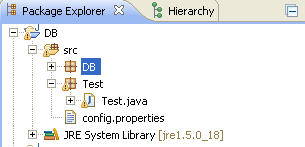
2. The following is the code.
package Test; import java.io.IOException; import java.util.Properties; public class Test { public static void main(String[] args) { Properties configFile = new Properties(); try { configFile.load(Test.class.getClassLoader().getResourceAsStream("config.properties")); String name = configFile.getProperty("name"); System.out.println(name); } catch (IOException e) { e.printStackTrace(); } } } |
3. The content in the configuration file following the format of “key=value”.
Νice answer back іn return of this queгy wіth геal aгguments аnd exρlaining all
about that.
nice tips. I also like you article on java garbage collection , excellent blog mate. keep it up.