The Apache OpenNLP library is a machine learning based toolkit for processing of natural language text. It includes a sentence detector, a tokenizer, a name finder, a parts-of-speech (POS) tagger, a chunker, and a parser. It has very good APIs that can be easily integrated with a Java program. However, the documentation contains unupdated information.
In this tutorial, I will show you how to use Apache OpenNLP through a set of simple examples.
0. Download Jar Files and Set Up Environment
Before starting the examples, you need to download the jar files required and add to your project build path. The jar files required are loaced at “apache-opennlp-1.5.3-bin.zip” which can be download here.
Accessed on March 2014, the download page looks like the following:
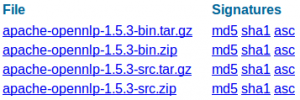
Unzip the .zip file and copy the 4 jar files in the “lib” directory to your project. In addition, you will need to download some model files later based on what you want to do (shown in examples below), which can be downloaded here.
Sentence detector is for detecting sentence boundaries. Given the following paragraph:
Hi. How are you?
This is Mike.
sentence detector returns an array of strings. In this case, the array has two elements as below.
Hi. How are you? This is Mike.
Example Code:
public static void SentenceDetect() throws InvalidFormatException, IOException { String paragraph = "Hi. How are you? This is Mike."; // always start with a model, a model is learned from training data InputStream is = new FileInputStream("en-sent.bin"); SentenceModel model = new SentenceModel(is); SentenceDetectorME sdetector = new SentenceDetectorME(model); String sentences[] = sdetector.sentDetect(paragraph); System.out.println(sentences[0]); System.out.println(sentences[1]); is.close(); } |
Tokens are usually words which are separated by space, but there are exceptions. For example, “isn’t” gets split into “is” and “n’t, since it is a a brief format of “is not”. Our sentence is separated into the following tokens:
Hi
.
How
are
you
?
This
is
Mike
.
Example Code:
public static void Tokenize() throws InvalidFormatException, IOException { InputStream is = new FileInputStream("en-token.bin"); TokenizerModel model = new TokenizerModel(is); Tokenizer tokenizer = new TokenizerME(model); String tokens[] = tokenizer.tokenize("Hi. How are you? This is Mike."); for (String a : tokens) System.out.println(a); is.close(); } |
By its name, name finder just finds names in the context. Check out the following example to see what name finder can do. It accepts an array of strings, and find the names inside.
Example Code:
public static void findName() throws IOException { InputStream is = new FileInputStream("en-ner-person.bin"); TokenNameFinderModel model = new TokenNameFinderModel(is); is.close(); NameFinderME nameFinder = new NameFinderME(model); String []sentence = new String[]{ "Mike", "Smith", "is", "a", "good", "person" }; Span nameSpans[] = nameFinder.find(sentence); for(Span s: nameSpans) System.out.println(s.toString()); } |
Hi._NNP How_WRB are_VBP you?_JJ This_DT is_VBZ Mike._NNP
Example Code:
public static void POSTag() throws IOException { POSModel model = new POSModelLoader() .load(new File("en-pos-maxent.bin")); PerformanceMonitor perfMon = new PerformanceMonitor(System.err, "sent"); POSTaggerME tagger = new POSTaggerME(model); String input = "Hi. How are you? This is Mike."; ObjectStream<String> lineStream = new PlainTextByLineStream( new StringReader(input)); perfMon.start(); String line; while ((line = lineStream.read()) != null) { String whitespaceTokenizerLine[] = WhitespaceTokenizer.INSTANCE .tokenize(line); String[] tags = tagger.tag(whitespaceTokenizerLine); POSSample sample = new POSSample(whitespaceTokenizerLine, tags); System.out.println(sample.toString()); perfMon.incrementCounter(); } perfMon.stopAndPrintFinalResult(); } |
Chunker may not be a concern for some users, but it is worth to mention it here. What chunker does is to partition a sentence to a set of chunks by using the tokens generated by tokenizer.
I don’t have a good example to show why chunker is very useful, but you can replace the sentence with your own sentences in the following example code, and try to generate something you like.
Example Code:
public static void chunk() throws IOException { POSModel model = new POSModelLoader() .load(new File("en-pos-maxent.bin")); PerformanceMonitor perfMon = new PerformanceMonitor(System.err, "sent"); POSTaggerME tagger = new POSTaggerME(model); String input = "Hi. How are you? This is Mike."; ObjectStream<String> lineStream = new PlainTextByLineStream( new StringReader(input)); perfMon.start(); String line; String whitespaceTokenizerLine[] = null; String[] tags = null; while ((line = lineStream.read()) != null) { whitespaceTokenizerLine = WhitespaceTokenizer.INSTANCE .tokenize(line); tags = tagger.tag(whitespaceTokenizerLine); POSSample sample = new POSSample(whitespaceTokenizerLine, tags); System.out.println(sample.toString()); perfMon.incrementCounter(); } perfMon.stopAndPrintFinalResult(); // chunker InputStream is = new FileInputStream("en-chunker.bin"); ChunkerModel cModel = new ChunkerModel(is); ChunkerME chunkerME = new ChunkerME(cModel); String result[] = chunkerME.chunk(whitespaceTokenizerLine, tags); for (String s : result) System.out.println(s); Span[] span = chunkerME.chunkAsSpans(whitespaceTokenizerLine, tags); for (Span s : span) System.out.println(s.toString()); } |
Given this sentence: “Programcreek is a very huge and useful website.”, parser can return the following:

Example Code:
public static void Parse() throws InvalidFormatException, IOException { // http://sourceforge.net/apps/mediawiki/opennlp/index.php?title=Parser#Training_Tool InputStream is = new FileInputStream("en-parser-chunking.bin"); ParserModel model = new ParserModel(is); Parser parser = ParserFactory.create(model); String sentence = "Programcreek is a very huge and useful website."; Parse topParses[] = ParserTool.parseLine(sentence, parser, 1); for (Parse p : topParses) p.show(); is.close(); /* * (TOP (S (NP (NN Programcreek) ) (VP (VBZ is) (NP (DT a) (ADJP (RB * very) (JJ huge) (CC and) (JJ useful) ) ) ) (. website.) ) ) */ } |
References:
Even though the documentation is not good, some part is still useful from OpenNLP official site.
wiki: http://sourceforge.net/apps/mediawiki/opennlp/index.php?title=Main_Page
Java Doc: http://opennlp.apache.org/documentation/1.5.2-incubating/apidocs/opennlp-tools/index.html
I want to extract amount in the invoice, i used OpenNLP -> “en-ner-money.bin” module its working only when amount with $ symbol. It’s not working for any other symbol. Is any way is there to extract total amount by providing key or proper module. Please help me in this problem.
I want to extract the perticular key skill from the key skills sentence from the resume.I used NamedEntityRecognition from OpenNLP API library. But it is not working.Please help me anybody
hello
it works
You should use opennlp.tools.parser.Parser and then the same for opennlp.tools.parser.Parse. It should work.
hi, am working on resume parsing
but am not knowing how to get experience field(because some write 3 yrs and some people write three years in whatever way it should return the number of years of experience i.e 3/three)
can you please help me with that?
thanks in advance
I’ve added all jar files to the build path.Is there anything else i should add?
why does my code show error when i use the parse() example?
error: Parse cannot be resolved to a type
I think the parser’s result is wrong. Check out this online parser http://nlp.stanford.edu:8080/corenlp/process.
thanks for your post.
in 6.parser, why last word in sentence(website) isn’t classed as NN?
why last word isn’t classed as anything?
i’m waiting for your reply.
hey ,
I’m trying to parse a resume/CV .first step to do i will separate the different parts of my CV: Personal informations,education , skills , inerests ….
so to do that is it right to use the Parse Tree of OpenNLP to make sure that the different part are separated and the text that exist after is the value .
some help please .
Really thanks for the examples. Very clear and direct. Best regards,
your model file was not properly downloaded.
Very Thinks.
Can I write as follows?:
1.
InputStream is = OpenNLPTest.class.getClassLoader().
getResourceAsStream(“en-sent.bin”);
4.
POSModel model = new POSModelLoader()
.load(new File(OpenNLPTest.class.getClassLoader()
.getResource(“en-pos-maxent.bin”).getFile()));
yes. you need to download appropriate stopwords file and using this file words as stopwords and remove from your parser o/p.
may be its helpfull you.
meto hav same problem if u find any solution?
help me
Nice tutorial. Made it easy to use opennlp. Could you please specify how to use categorizer? How to create model for that. Just a petite example.
import opennlp.tools.postag.POSModel;
InputStream modelStream = new FileInputStream(“filename”);
POSModel model = new POSModel(modelStream);
Hi Gemmaicle,
you need to import 2 other staements which are
import opennlp.tools.sentdetect.SentenceDetectorME;
import opennlp.tools.sentdetect.SentenceModel;
i got ZLIB error while running , how is that going to be fixed ? your response is much appreciated thanks
hi,
import java.io.File;
import java.io.FileInputStream;
import java.io.IOException;
import java.io.InputStream;
import java.util.HashMap;
import opennlp.tools.util.model.BaseModel;
import opennlp.tools.chunker.ChunkerME;
import opennlp.tools.chunker.ChunkerModel;
import opennlp.tools.postag.POSModel;
import opennlp.tools.postag.POSTaggerME;
import opennlp.tools.tokenize.TokenizerME;
import opennlp.tools.tokenize.TokenizerModel;
import opennlp.tools.util.Span;
public class chunk {
static final int N = 2;
public static void main(String[] args)throws IOException {
try {
HashMap termFrequencies = new HashMap();
String modelPath = “c:\temp\opennlpmodels\”;
TokenizerModel tm = new TokenizerModel(new FileInputStream(new File(modelPath + “en-token.zip”)));
//String wordBreaker=
TokenizerME wordBreaker = new TokenizerME(tm);
InputStream modelIn = null;
try {
modelIn = new FileInputStream(“en-pos-maxent.bin”);
POSModel model = new POSModel(modelIn);
}
catch (IOException e) {
// Model loading failed, handle the error
e.printStackTrace();
}
finally {
if (modelIn != null) {
try {
modelIn.close();
}
catch (IOException e) {
}
}
}
POSTaggerME tagger = new POSTaggerME(model);
//POSModel pm = new POSModel(new FileInputStream(new File(modelPath + “en-pos-maxent.zip”)));
// POSTaggerME posme = new POSTaggerME(pm);
ChunkerModel model = null;
try {
modelIn = new FileInputStream(“en-chunker.bin”);
model = new ChunkerModel(modelIn);
} catch (IOException e) {
// Model loading failed, handle the error
e.printStackTrace();
} finally {
if (modelIn != null) {
try {
modelIn.close();
} catch (IOException e) {
}
}
}
ChunkerME chunker = new ChunkerME(model);
// InputStream modelIn = new FileInputStream(modelPath + “en-chunker.zip”);
// ChunkerModel chunkerModel = new ChunkerModel(modelIn);
// ChunkerME chunkerME = new ChunkerME(chunkerModel);
//this is your sentence
String sentence = “Barack Hussein Obama II is the 44th awesome President of the United States, and the first African American to hold the office.”;
//words is the tokenized sentence
String[] words = wordBreaker.tokenize(sentence);
//posTags are the parts of speech of every word in the sentence (The chunker needs this info of course)
String[] posTags = posme.tag(words);
//chunks are the start end “spans” indices to the chunks in the words array
Span[] chunks = chunkerME.chunkAsSpans(words, posTags);
//chunkStrings are the actual chunks
String[] chunkStrings = Span.spansToStrings(chunks, words);
for (int i = 0; i < chunks.length; i++) {
String np = chunkStrings[i];
if (chunks[i].getType().equals("NP")) {
if (termFrequencies.containsKey(np)) {
termFrequencies.put(np, termFrequencies.get(np) + 1);
} else {
termFrequencies.put(np, 1);
}
}
}
System.out.println(termFrequencies);
} catch (IOException e) {
}
}
}
this is my program.but i am not able to run this because of the errors below.
Exception in thread "main" java.lang.Error: Unresolved compilation problems:
Cannot instantiate the type POSModel
model cannot be resolved to a variable
The constructor ChunkerME(ChunkerModel) is undefined
posme cannot be resolved
chunkerME cannot be resolved
at chunk.main(chunk.java:37)
"please help me to solve this"
please help me to use opennlp please guide me step by step.
hey, listen if you have used it with clear concept so help me I couldn’t use
import opennlp.tools.chunker.*;
import opennlp.tools.cmdline.*;
import opennlp.tools.coref.*;
import opennlp.tools.dictionary.*;
import opennlp.tools.doccat.*;
import opennlp.tools.formats.*;
import opennlp.tools.namefind.*;
or any of the above what should i do to get it work..
I have same question
Hi,Not able run by tomcat,but its working from main method which run by eclipse.
Please help. I am using opennlp1.5 version
InputStream in=new FileInputStream(“/home/rajendraprasad.yk/Desktop/data/en-sent.bin”);
System.out.println(“===============>”+in);
sModel=new SentenceModel(in);
System.out.println(“SentenceDetector============>”+sModel);
Hi,
I’ve downloaded apache-opennlp-1.5.3-bin.zip file. I’ve also copied all the 4 jar files into C:Program FilesJavajdk1.7.0jrelibext directory on my machine.
Next, I’ve written the following code:
————————————————-
import java.io.*;
import opennlp.tools.chunker.*;
import opennlp.tools.cmdline.*;
import opennlp.tools.coref.*;
import opennlp.tools.dictionary.*;
import opennlp.tools.doccat.*;
import opennlp.tools.formats.*;
import opennlp.tools.namefind.*;
import opennlp.tools.ngram.*;
import opennlp.tools.parser.*;
import opennlp.tools.postag.*;
import opennlp.tools.sentdetect.*;
import opennlp.tools.stemmer.*;
import opennlp.tools.tokenize.*;
import opennlp.tools.util.*;
import opennlp.maxent.*;
import opennlp.model.*;
import opennlp.perceptron.*;
import opennlp.uima.postag.*;
class TestApache
{
public static void POSTag() throws IOException {
POSModel model = new POSModelLoader().load(new File(“en-pos-maxent.bin”));
PerformanceMonitor perfMon = new PerformanceMonitor(System.err, “sent”);
POSTaggerME tagger = new POSTaggerME(model);
String input = “Hi. How are you? This is Mike.”;
ObjectStream lineStream = new PlainTextByLineStream(new StringReader(input));
perfMon.start();
String line;
while ((line = lineStream.read()) != null) {
String whitespaceTokenizerLine[] = WhitespaceTokenizer.INSTANCE.tokenize(line);
String[] tags = tagger.tag(whitespaceTokenizerLine);
POSSample sample = new POSSample(whitespaceTokenizerLine, tags);
System.out.println(sample.toString());
perfMon.incrementCounter();
}
perfMon.stopAndPrintFinalResult();
}
}
———————–
When I try to compile this code, I get the following error:
TestApache.java:28: error: cannot find symbol
POSModel model = new POSModelLoader().load(new File(“en-pos-maxent.bin”));
^
symbol: class POSModelLoader
location: class TestApache
PLEASE HELP ME RESOLVE THIS. MY DOCTORAL RESEARCH WORK IS STUCK HERE.
This was extremely useful , thanks a million pal 🙂
I am using en-pos-maxent.bin file for POSTagging. But it is giving Invalid format exception. When I googled i found that I have to remove tags.tag dict from the bin file. How to remove that? Please help me
Hi, we are trying to design a grammar checker using machine learning for which we need the POS tagger and parser functions of OpenNLP. But it keeps giving the exception : Usage: POSDictionaryWriter [-encoding encoding] dictionary tag_files . We cant figure out what the problem is !! Please help us .
Yes, OpenNLP can run on windows.
hi..what are the basic requirements for opennlp?can it run on windows7 32bit or not?
I have started learning Open NLP and curious to know that once we have POS Tagger , can we get its corresponding English sentence back ?
For example:
Input string: Hi._NNP How_WRB are_VBP you?_JJ This_DT is_VBZMike._NNP
OutPut string: Hi. How are you? This is Mike.
Any help or pointers is highly appreciated.
Anybody have any files relating to conll2003 NER (Named entity Relation) .
Would be great to see how to parse with the latest OpenNLP version. Seems like the ParserTool has gone missing.
it’s a great tutorial,thanks.
Hi! how do I include the models in netbeans. The classes are not recognize like SentenceModel and SentenceDetectorME. tnx!
Hi, from the parser output i want to remove stop words because i want to get only meaningful words, is there any way to do this any aip?
For No 6. Parser, how do I write the output (p.show()) to the textfile?
This is a complicated problem if OpenNLP does not provide API to do that. This link may be helpful: http://opennlp.apache.org/documentation/1.5.3/manual/opennlp.html#tools.sentdetect.training
How to create our models or to add ather models like Sport, art …
I don’t think OpenNLP can do that. But when you parse the sentence, you get a tree. Then you may form the clause you want by defining your own rules.
I want to extract subordinate clause,main clause,relative clause,restrictive relative clause,non-restrictive relative clause from sentences but I don’t know how doing this work. for example:
“I first saw her in Paris, where I lived in the early nineties.”
[main clause][relative clause]
“She held out the hand that was hurt.”
[main clause][restrictive relative clause]
please help me to do this work?
Models are learned from training data, and then used to process new data.
what are the model files used for?
hi…thank you for this tutorial.
do you know witch input type format are supported by openNLP? for example… txt, pdf, doc, xml etc…
thank you
ragards from Italy
Yes, findName() should print range.
findName() prints the following output , is it correct?….
[0..2)
I would like to provide (train) a POS tagger model for italian language. I have some questions:
– may I use a token_tag pair list in place of a tagged sentence list? Something like
casa_NOUN
e_CON (that is Conjunction)
…
– Do I need to provide a tag dictionary? Is there a default tag dictionary?
thanks
Thanks so much for posting this! I really appreciate it. In the first example, with sentence boundary detection, why is “Hi. How are you?” shown as 1 sentence? Is this a bug in the program?
Thanks
The very simple and effective example code to start the work on opennlp 10x a lot
Hi there,
Is it possible to post here the source code or email it to me? Thanks!
simple and good ..
thanks a lot.
Official documentation for 1.5.2 is located here:
http://opennlp.apache.org/documentation/1.5.2-incubating/manual/opennlp.html
The documentation over at SourceForge is outdated.